Don't miss our holiday offer - up to 50% OFF!

Your IPTV Connection in the UK, Sorted: Speed, Wi-Fi and Provider Checks That End Buffering

Twenty minutes into the second half, my brother-in-law’s screen froze on a blurry close-up of a goalkeeper. Six adults groaned in unison. Somebody blamed the telly, somebody blamed the weather, and nobody blamed the actual culprit: a tired router wedged behind a fish tank.
That evening taught me something I’ve repeated to readers ever since. A dependable IPTV connection UK households can count on isn’t about buying the fastest broadband package on the market. It’s about four things working together: a sensible line speed, a properly placed router, an ISP that doesn’t strangle peak-time traffic, and a provider with infrastructure that copes when the whole country presses play at once.
Over fifteen years I’ve tested more set-top boxes, Fire Sticks and smart TV apps than I care to admit. What follows is the practical version of everything I’ve learned, written for viewers who just want a stable picture and for the people who sell the service to them.
What a Reliable IPTV Connection UK Viewers Can Trust Actually Needs
Strip away the jargon and IPTV is simply television delivered over your internet line instead of an aerial or satellite dish. Your device asks a server for a stream, the server sends small chunks of video, and your app stitches them together faster than you can watch them. When any link in that chain slows down, the buffer empties and the spinning wheel appears.
Most people assume the fix is more megabits. Sometimes it is. More often, though, an unstable IPTV connection UK users complain about comes down to consistency rather than raw speed.
Think of it like a motorway. A three-lane road that’s clear at noon can still grind to a halt at half past eight on a Friday, and video streams hate stop-start traffic far more than they hate a slightly narrower road.
Broadband Speed: The Number Everyone Gets Wrong
Broadband adverts love big headline figures. Yet a 500Mbps fibre package won’t rescue you if your Wi-Fi delivers a tenth of that to the living room.
As a rough guide, here’s what each stream on your IPTV connection UK setup tends to need. These are my working figures from years of testing, broadly in line with the guidance streaming platforms such as Netflix publish on their help pages.
| Picture quality | Suggested steady speed per stream | What happens below that |
|---|---|---|
| SD | 3 to 5 Mbps | Soft picture, occasional pauses |
| HD (720p to 1080p) | 8 to 12 Mbps | Drops to lower quality during busy moments |
| Full HD fast motion | 15 to 20 Mbps | Stutter during quick camera pans |
| 4K UHD | 25 to 35 Mbps | Frequent buffering, app falls back to HD |
Notice the word “steady” in that table. A connection that averages 40Mbps but dips to 6Mbps every few minutes will give you a worse evening than one sitting calmly at 20Mbps all night.
Households also forget to add things up. Two teenagers gaming, someone on a video call and a 4K stream in the lounge can easily ask for more than a modest copper-based line can give. Ofcom’s Connected Nations reports show full-fibre availability climbing year after year across the country, so if you’re still on an older FTTC package, check whether an upgrade has reached your street.
So what’s the sweet spot? For a typical family running one or two streams, I’d want a dependable 50 to 80Mbps on the device itself, not just at the router. That’s where an IPTV connection UK homes can rely on usually begins.
Your Router Is Quietly Ruining Your Evening
Remember the fish tank? Water absorbs Wi-Fi signals remarkably well, and so do thick walls, mirrors, kitchen appliances and metal radiators. Many British homes, especially Victorian terraces with solid brick interior walls, are surprisingly hostile to wireless signals.
Ethernet Beats Wi-Fi Every Single Time
A cable from router to box is the single cheapest upgrade I recommend. It removes interference, lowers latency and makes your IPTV connection UK evenings far more predictable.
Can’t run a cable across the hallway without a domestic incident? Powerline adapters from brands like TP-Link and Devolo push network data through your electrical wiring, and they work well in most modern homes. Older wiring can be hit and miss, so buy from a retailer with an easy returns policy.
Quick Router Fixes That Actually Work
- Move the router out of cupboards and off the floor, ideally to a central, raised spot.
- Use the 5GHz band for streaming devices; it’s faster over short distances, while 2.4GHz travels further but crowds easily.
- Restart older ISP-supplied routers once a week.
- Consider a mesh system such as Google Nest Wifi, BT Whole Home or Eero for larger or multi-storey homes.
- Update the firmware on both the router and the streaming device.
Not every fix suits every house. A mesh kit is brilliant in a sprawling semi but overkill in a one-bed flat, where a simple cable usually solves everything.
Peak Time, ISPs and the VPN Question
Here’s a pattern I’ve seen hundreds of times. An IPTV connection UK viewers swear by on a Tuesday afternoon suddenly wobbles every Saturday from about 7pm. That timing isn’t a coincidence.
Between roughly 7pm and 11pm, broadband networks carry their heaviest loads. Some providers manage that congestion more gracefully than others, and Which? has published consumer research over the years comparing how real speeds hold up against advertised ones. If your problems appear at the same time every evening, your ISP’s network is a likely suspect.
Where do VPNs fit in? A reputable VPN such as NordVPN, Surfshark or Proton VPN encrypts your traffic, which can stop an ISP from identifying and shaping a particular type of streaming. It also adds a little overhead, and a poorly chosen server on the other side of Europe can make things worse rather than better.
Personally, I see a VPN as a tool for privacy and for routing around congestion, not a magic speed button. Test with it on and off, at the same time of evening, before deciding whether it earns a place in your IPTV connection UK routine.
DNS is the other quiet culprit. Switching your device to a fast public resolver such as Cloudflare’s 1.1.1.1 or Google’s 8.8.8.8 can shave a moment off channel changes, though it rarely cures genuine buffering.
Why the IPTV Provider Matters More Than Your Package
You can do everything right at home and still have a miserable night. Once your line, router and ISP are sorted, the remaining variable is the server at the other end.
What separates a premium iptv service from the rest is investment in things viewers never see: load-balanced servers, UK and European edge locations, sensible user limits per server and engineers who are awake when traffic spikes. A cheaper iptv provider might advertise a dazzling channel count while running everything from a single overloaded machine.
Big live events expose the gap most clearly. Every stream request lands at once, and weak infrastructure simply can’t hand out video chunks fast enough, no matter how good your own IPTV connection UK setup is.
What to Look For Before You Pay
When I’m sizing up a new service, these are the signals I weigh first.
| Signal | A provider worth trusting | A provider to avoid |
|---|---|---|
| Trial access | Short trial or demo for real-world testing | No trial, pressure to buy long plans |
| Server locations | UK or nearby European servers named openly | Vague answers or none at all |
| Support | Replies within hours and explains fixes | Generic replies, vanishes after payment |
| Payment terms | Monthly options with clear renewal | Only 12-month bundles paid up front |
| Content rights | Clear about what’s licensed | Avoids the question entirely |
Before committing, always ask for a trial or demo and test it during peak hours, not at lunchtime. I’ve written a fuller walkthrough of what to check in IPTV Demo Panel Explained: What Viewers and Every IPTV Reseller Should Check Before Buying → /iptv demo panel explained, and it’s worth ten minutes of your time before handing over any money.
Is a higher price always a sign of quality? Not quite. Some expensive services are simply resold with a markup, which brings us neatly to the people doing the reselling.
A Word for Every IPTV Reseller Selling in Britain
If you run a reseller business, your customers will judge you on one thing above all: whether their IPTV connection UK experience holds up on a busy night. They won’t care whose servers you use; they’ll care that you sold it to them.
I’ve spoken to plenty of operators over the years, and the successful ones treat each sale as a support relationship rather than a transaction. A smart iptv reseller explains the home setup side as carefully as the subscription itself, because most complaints start with Wi-Fi rather than the panel.
- Test your upstream supplier at peak times from several UK regions before reselling.
- Send new customers a short setup guide covering ethernet, 5GHz Wi-Fi and app settings.
- Log buffering complaints by time and device so patterns become obvious.
- Offer short trials so buyers can test their own IPTV connection UK conditions first.
- Be transparent about licensing and never promise content you can’t legitimately supply.
For the operational side, our guide to managing reseller credits and renewals explained covers how to keep customers active without chasing them every month.
Testing Your IPTV Connection UK Setup in Fifteen Minutes
Theory is lovely, but evidence is better. This is the routine I run whenever a friend rings me in a panic, and it takes about a quarter of an hour.
- Run a speed test on the streaming device itself, using Ookla’s Speedtest app or Fast.com, rather than on your phone in another room.
- Repeat the test at around 8pm on a weekday and note any big drop compared with the afternoon.
- Plug in an ethernet cable temporarily, even a long one trailing down the hallway, and test again.
- Check latency and jitter. Anything under 30ms latency with low jitter is comfortable for live streams.
- Clear the app cache on your Fire Stick, Android box or smart TV, then restart the device.
- Switch to the provider’s alternative servers or stream formats if the app allows it.
- Try the same stream on a second device to rule out a failing box.
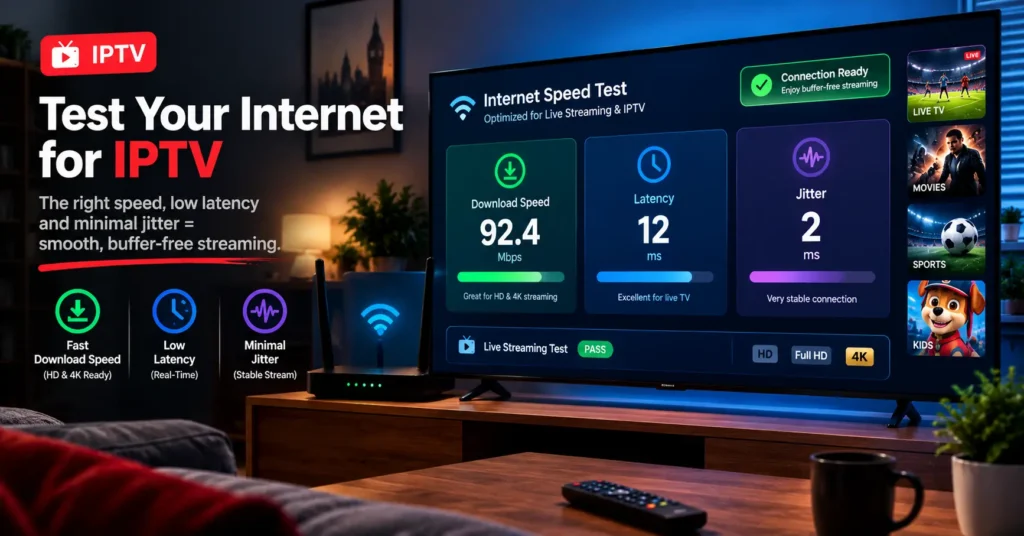
Write the results down. Really. A simple note of time, device and speed turns vague frustration into a pattern you can fix, and it gives your provider or ISP something concrete to work with.
Once you’ve done this a couple of times, you’ll know within minutes whether a poor IPTV connection UK evening is down to your home, your ISP or the service.
Devices Make a Difference Too
Older Fire TV Sticks and budget Android boxes often struggle with high-bitrate streams because of limited memory and weak Wi-Fi chips. The Fire TV Stick 4K Max, Nvidia Shield TV and recent Apple TV models all handle demanding streams comfortably, though the Shield costs considerably more. Smart TV apps are convenient, yet they’re often the slowest option of all.
An underpowered box can mimic every symptom of a bad line. Before blaming anyone else, make sure your device isn’t the bottleneck in an otherwise solid IPTV connection UK chain.
Staying on the Right Side of UK Law
This is the part many guides skip. IPTV as a technology is perfectly legal and powers plenty of mainstream services, but streaming content without the rights holder’s permission isn’t.
The UK Intellectual Property Office and the Federation Against Copyright Theft (FACT) have both warned that unauthorised streaming carries real legal risk, with sellers facing the most serious consequences. Which? has also highlighted the security dangers of unofficial apps and devices, from malware to compromised payment details.
Why does this belong in a connection guide? Because shady services tend to cut corners everywhere, including server quality. A legitimate premium iptv service with properly licensed content is almost always more stable, better supported and far less likely to vanish overnight with your money.
My advice is simple. Choose a service that’s open about what it licenses, keep your receipts, and walk away from anything promising a flawless IPTV connection UK experience for pennies.
One Last Thought Before You Press Play
Getting a smooth picture isn’t luck, and it isn’t only about paying more. It’s a chain of small, sensible decisions: a decent line, a cable where you can manage one, an ISP that copes at peak time and an iptv provider that has invested properly behind the scenes.
Fix the weakest link first. For most people that’s the router, and it costs next to nothing to sort out.
Whether you’re watching from a flat in Glasgow or selling subscriptions from a spare room in Bristol, the goal is the same: an IPTV connection UK viewers stop thinking about because it simply works. Run the fifteen-minute test this week, and I suspect your next big Saturday night will be a lot quieter, for all the right reasons.
Frequently Asked Questions
What speed do I need for a stable IPTV connection UK households can rely on?
Aim for a steady 10 to 12Mbps per HD stream, measured on the device itself rather than at the router. For 4K, plan for 25 to 35Mbps, and add more for every extra stream running at the same time. Consistency matters more than the headline figure on your broadband bill. A family running two or three streams usually feels comfortable with 50 to 80Mbps of real-world speed.
Why does my IPTV connection UK service buffer only in the evenings?
Evening buffering usually points to congestion, either on your ISP’s network or on the provider’s servers. Between about 7pm and 11pm, demand across British broadband rises sharply. Test at the same time with ethernet connected to rule out your home setup first. If the problem remains, try a reputable VPN or contact your provider with your test results.
Is a VPN necessary for IPTV in the UK?
No, a VPN isn’t essential for most viewers. It can help if your ISP is shaping streaming traffic or if you value extra privacy. However, it adds a little overhead, and a distant server can slow things down. Test with and without it at peak times before deciding.
How can I tell if a premium iptv service is genuinely reliable?
Ask for a trial and test it during busy evening hours rather than quiet afternoons. Look for openly named UK or European server locations, responsive support and flexible monthly plans. A trustworthy service will also be clear about what content it’s licensed to provide. If any of these are missing, keep looking.
What should an iptv reseller check before choosing a supplier?
Test the supplier’s streams at peak time from several UK locations, not just your own home. Check panel reliability, support response times and how credits and renewals are handled. Ask directly about licensing and avoid anyone who dodges the question. Your reputation depends on their infrastructure, so treat the trial period as a proper audit.